The hard part was always keeping it up to date.
You meet someone interesting and have a great conversation. You learn about the weird thing they’re obsessed with, what they’re working on, and something you could probably help with. Six months later, you remember bits of it. Or you remember the conversation perfectly and cannot, for the life of you, remember who it was with.
A personal CRM gives those details somewhere to live. I have more than 2,500 people in mine. I want to remember people because I like them, because I’m curious about what they’re doing, and because I love making useful introductions. A detail from a conversation years ago can suddenly become relevant when someone else asks a question.
The annoying part is the maintenance. Sitting down after every call to fill in twelve fields is a pretty good way to stop using your CRM. AI can make that part much easier. You can give it a messy note, have it suggest where the details belong, and check the result instead of doing all the organizing yourself.
I had Codex and ChatGPT help me build my own interface and storage setup locally, with linked tags for things like location and strengths. I use Tailscale to access the interface privately. But my most common interface is actually Codex. I ask questions, add context, and look for people through a conversation.
You can build something similar in Notion, Obsidian, or another tool you already like. This guide walks through the structure I use as a starting point, then shows how you could add AI updates and automations. The messaging and social integrations below are optional ways to build your own version. The screenshots are illustrative demos with fictional records and private identifiers omitted, not exports of anyone’s actual conversations.

1. Pick a home for the information.
Choose a place where you can open a person’s profile, read their history, and get your data back out. You should be able to use the CRM even when the AI is unavailable. The assistant needs a real place to save things; a long chat you hope it remembers is a shaky substitute.
For a Notion version, you could make a People database and a Conversations database, then connect them with a relation. Each conversation points to the relevant person. If you want shared location and expertise pages, those can be separate databases too. Notion’s relations support this kind of structure. Connecting an AI assistant is an additional step, with its own permissions.
In Obsidian, you could keep one Markdown note per person, use properties for simple fields, and link to notes about locations, interests, and conversations. Bases can provide table-like views over those files. Your dated conversation notes can stay in the body of the person’s note or in separate linked notes. That choice matters less than being able to find them again.
A custom local app gives you more control over the interface and how updates are saved. That’s the route I took with Codex and ChatGPT. It also means you own the boring parts: backups, access, upgrades, and fixing whatever breaks. Tailscale Serve is one way to make a local web interface reachable inside your private network. It is separate from deciding what an AI service is allowed to read.
If you already love one of these tools, start there. The setup can be small. A person record, dated notes, a few shared tags, and a way to search are plenty to begin with. Build the nicer dashboard once you know what you actually use.
2. Give every person a useful profile.
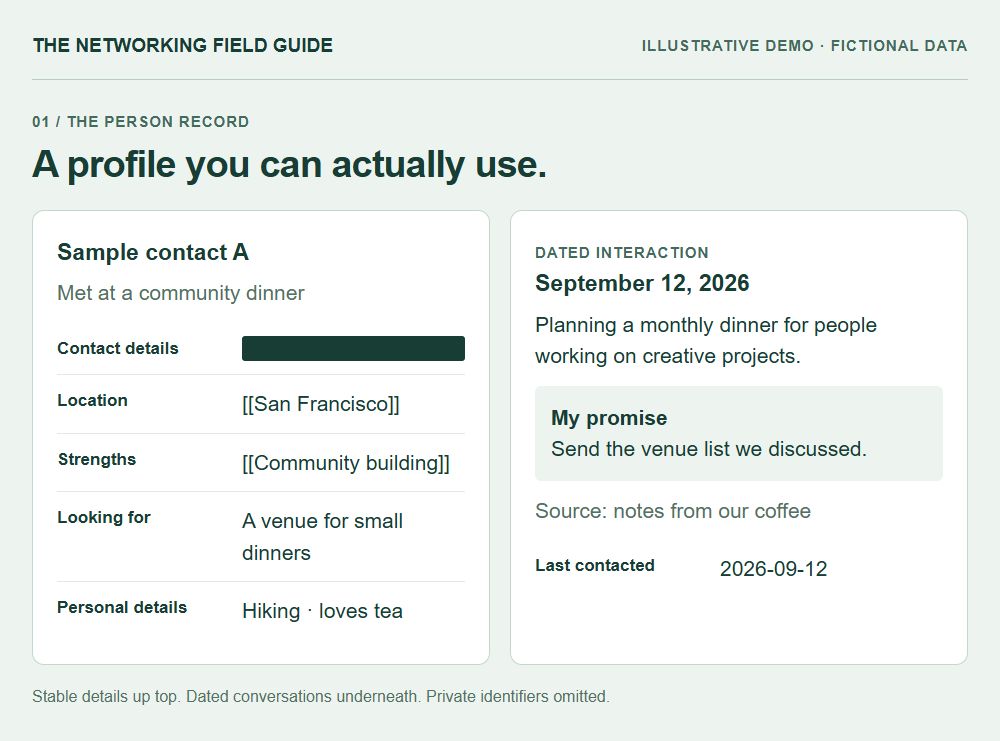
My CRM separates the person’s ongoing details from dated interactions. The profile answers “Who is this person, how do I know them, and what should I remember?” The timeline answers “What happened when we talked?” That separation saves a lot of confusion later.
You do not need to fill every field. An empty field is better than an impressive-sounding guess. Start with a small group you know well enough to describe, then add detail when it becomes useful.
A field existing in a template is not a reason to collect it. You can have a very useful CRM without birthdays, family details, or phone numbers for everyone.
Name: [person]
Record ID: [stable ID]
Contact routes: [confirmed email / profile link]
Status: [your preferred catch-up cadence]
Last contacted: [original date of direct contact]
Location: [[shared location]]
Occupation: [role, with date if historical]
How we met: [a detail you will recognize]
Looking for: [current need + date learned]
Strengths: [[shared strength]]
Introductions sent: [who + when]
Personal details: [interests they shared]

Interactions, newest first
[Date] [What we discussed + source]
Promise: [what I said I would do]
Milestone: [expected event + date or month + status]
- Name and contact information
- A name, a stable record ID, and whichever contact routes you actually know. Keep email, phone, and profile links in separate fields so you can match the right person later.
- Relationship status and last contacted
- How often you want to keep in touch, plus the date of the latest supported direct contact. My setup includes an Annual status; people you are not actively following up with can stay Archived.
- Location, occupation, and how we met
- Current location when known, what they do, and the original connection. “Met at the community dinner and talked about local art” is a much better memory cue than “networking.”
- Looking for and strengths
- What they currently want help with, and what they can help others with. Keep those separate. Wanting to learn fundraising does not make someone a fundraising expert.
- Introductions sent
- Who you connected, when, and any useful context. This helps avoid repeating an introduction or forgetting that two people already know each other.
- Personal details
- Interests, hobbies, things to ask about, food preferences, and birthdays when shared. Include only details you have a good reason to remember. Unknown years stay unknown.
- Conversations, promises, and milestones
- Dated notes, things you said you would do, and meaningful future events. Give reminders a home where they can be found again instead of hiding them in a paragraph.
4. Ask AI to build a small version first.
You can describe the system you want in normal language. You do not need to start by deciding which database engine to use. Tell the assistant where you want your information to live, how you want to access it, and what you need to do with it. Ask it to explain the tradeoffs before building anything complicated.
Here’s a starting prompt I’d use. Replace the storage choice with your own. If you use a cloud notes app, ask for the same structure there and keep its sharing settings private. The local interface and Tailscale parts only apply if you choose that route.
- Create one sample person and one dated conversation.
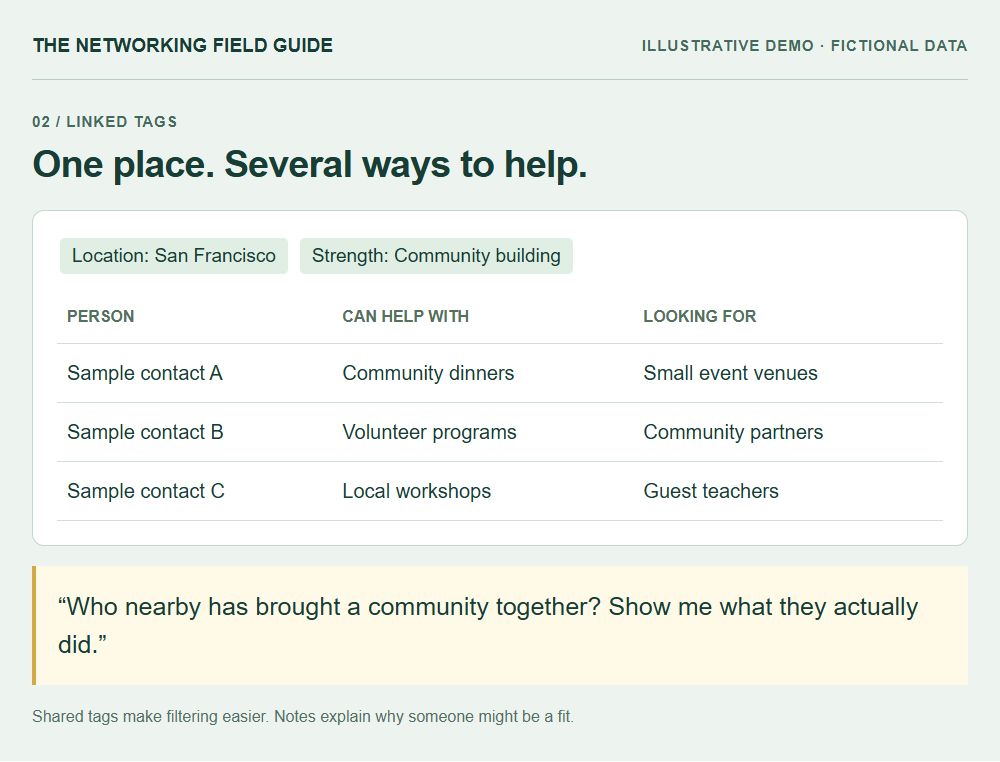
- Add a second person with the same location or strength and check that filtering finds both.
- Save a note, close the interface, and reopen it to confirm it persisted.
- Ask a question whose answer is in the note. Open the evidence it returns.
- Export the sample records and try a restore before adding information you care about.
These prompts are instructions for a system you build or connect. They do not give a chat app access to files, accounts, or a database by themselves.
Help me build a private personal CRM in [my chosen tool]. Start with ten sample contacts.

Each person needs a stable ID, name, contact routes, relationship status, last-contact date, location, occupation, how we met, strengths, current needs, introductions, personal details, and dated conversation notes. Link shared locations, strengths, and interests. Keep promises and future milestones easy to find.

Let me search in plain English and open the notes supporting each answer. Propose updates for review before saving. Do not invent missing facts, merge people on name alone, or send messages.

Show me how to export, back up, and restore the data. If this is a local web app, keep it private and explain how I could access it through Tailscale. Build the smallest working version and walk me through using it.
5. Use your email history to get past the blank page.
You might already have the beginnings of a great CRM sitting in your inbox. Years of conversations, introductions, plans, and little updates about what people are doing. Starting from that is a lot easier than staring at an empty database and trying to remember everyone you know.
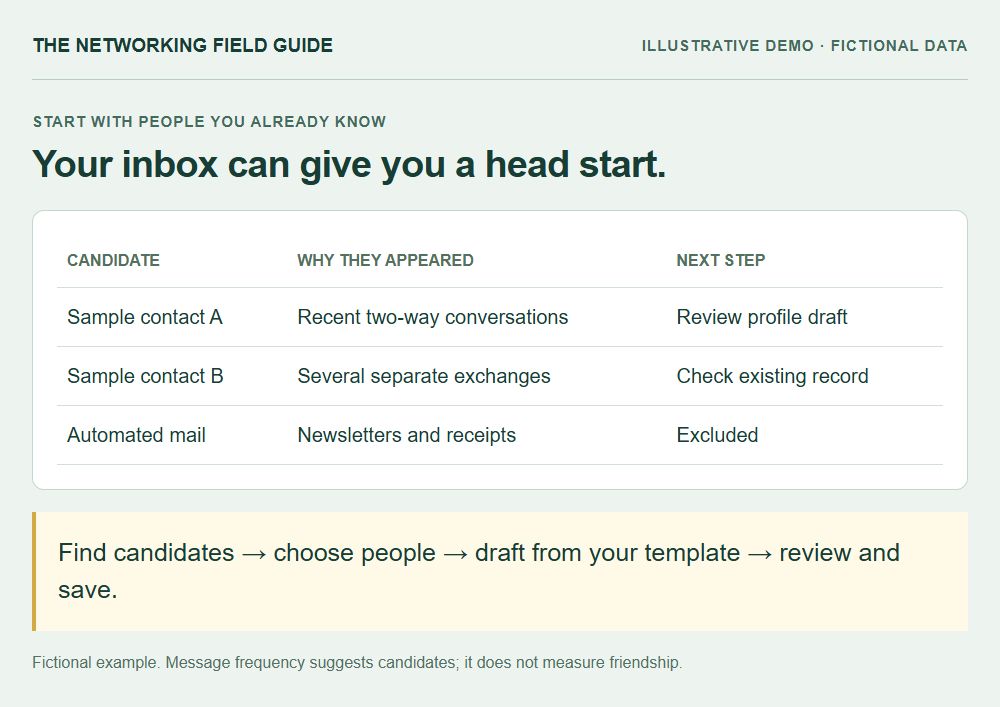
If you want to connect email, start by having AI suggest people to include. The people you have emailed recently or exchanged messages with frequently are often good candidates. I would look at direct, two-way conversations first. Someone you have talked with several times over a few months is a more promising starting point than a newsletter you receive every morning.
Give the assistant a limited window, like the last three months, and ask for a shortlist of twenty candidates. Exclude newsletters, receipts, automated notifications, support addresses, and mass mail. Look at separate conversations as well as message count: one long scheduling thread should not make someone look like your closest friend. Recency and frequency help you find candidates; they do not decide how much a relationship matters.
Once you have picked a few people, ask AI to draft their profiles using your template. It can pull a role from a signature, a shared interest from a conversation, or a useful “how we met” detail from an introduction thread. Each suggested fact should include the message date and a way to open its source. A title in a signature from four years ago belongs in historical context until you confirm it is current.
Review the drafts before adding them. Check the full email address against the existing record, and confirm that any additional addresses really belong to that person. A matching name or company is only a clue. Also check that quoted text was not attributed to the wrong participant, and that an introduction did not get mistaken for a conversation you personally had. Leave fields blank when the messages do not support them. You can fill them in naturally later.
This gives you something useful surprisingly quickly: a handful of profiles grounded in relationships you already have. Then you can expand backward through older history or add people who mostly talk to you somewhere else. Your inbox will miss friends you see in person, so treat it as a starting point, not a complete picture of your life.
Using only the email account and date range I authorize, suggest up to 20 people for my personal CRM based on recent and repeated direct, two-way conversations. Exclude automated mail, newsletters, transactions, and shared support addresses. Show why each person is a candidate, the dates of our exchanges, and any identity uncertainty. Do not save profiles yet. After I choose people, draft profiles using my template. Cite the messages supporting each fact, preserve historical dates, leave unknown fields blank, and check for existing records before proposing new ones.
6. Make adding a note feel like talking.
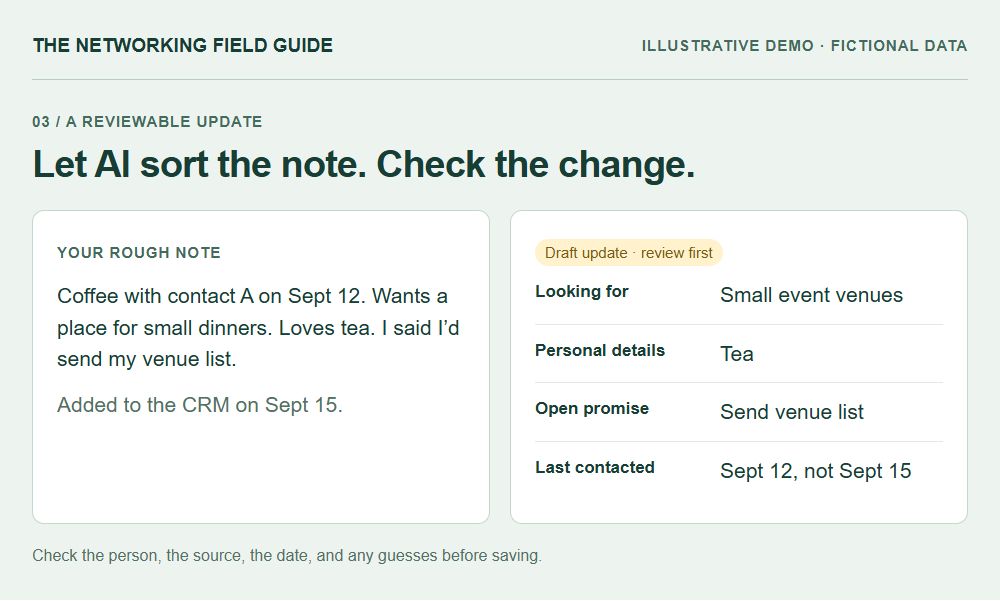
This is where AI can remove a lot of the work. After a conversation, you could dictate a rough note: “We got coffee on Friday. They’re organizing dinners for creative people, they love tea, and I said I’d send my venue list.” You should not have to translate that into a perfectly formatted database entry yourself.
The assistant can look up the existing person, compare the note with what is already there, and propose a small update. The tea preference might belong in personal details. The dinner plan needs a dated note. The venue list is your open promise. If the person is actively looking for venues, that can also inform their current needs without copying the entire conversation into every field.
Have it show what it plans to change. You want to be able to spot a wrong person, a misunderstood date, or a sentence that became more certain than the original. “Thinking about moving” must not turn into “Lives in Austin.” When information conflicts, keep the original context and ask what needs clarification.
A helpful update also remembers where the fact came from. That can be a link to a meeting note, a dated personal note, or a source reference that you can reopen. You do not need to retain a full transcript inside every profile. Keep the useful summary and an appropriate way to check it.
Start by checking a few updates yourself. You will quickly see whether the assistant understands your notes and puts details in the right places. Once that works consistently, choose which updates it can save on its own. We’ll get to that below.
7. Be very clear about “last contacted.”
This sounds like a tiny detail until every reminder depends on it. Decide what counts as contact. A direct message you sent might count as an outreach attempt. An actual back-and-forth is a conversation. Seeing someone’s post, adding their profile, or editing an old note is neither.
You can keep separate dates for last outgoing message and last conversation if that distinction helps you. At minimum, make sure an unanswered message does not get summarized as a catch-up. A reminder system should know the difference between “we spoke last week” and “I reached out last week.”
Use the date of the original interaction. If you import a conversation from March in September, Last Contacted should not become September. If a newer contact date is already recorded, historical imports should preserve it. In ordinary updates, you want the latest supported date to win.
The same idea applies to future events. “Planning to move in November” is a plan with month-level precision. It is not proof of a move on November 1. A milestone reminder could suggest asking how the move is going, but it should not announce that the move happened. Canceled or rescheduled plans should update the existing reminder instead of creating a second one.
Ask your assistant to demonstrate these cases with made-up data. An old note, an unanswered message, a postponed event, and two contacts with the same name are excellent tests. If the system handles those clearly, you will have much more confidence in the ordinary cases.
8. Add outside sources one at a time, if you want them.
You can get a lot of value from dictated notes alone. If you want a CRM that updates from other places, the general process is similar: read an authorized source, identify the person, extract a useful change, compare it with the existing record, and save the reviewed update. Each source needs its own connection and rules.
After the initial email-based profiles, you could schedule a daily check for new conversations with those contacts. Have the workflow remember which messages it has processed so tomorrow’s run picks up where today’s stopped. A retry should not create duplicate notes. Keep a short change history so you can see what was added and undo a bad update.
You can gradually let a few well-tested updates save automatically. For example, an exactly matched contact’s latest direct-message date could advance when a genuinely newer exchange appears. New contacts, identity conflicts, and major changes to a biography can stay in a review queue. Start with drafts, watch what the assistant gets wrong, and decide which specific changes you trust it to make. Saving a note and sending someone a message should remain separate actions.
For WhatsApp, a supported chat export can be a starting point for a selective import. That is a snapshot, not continuous synchronization. Keeping it current would require a separately supported and authorized workflow. For iMessage, a setup could work from selected messages on your own authorized Apple device, using a reviewed local process. The available tools will depend on your devices and the service.
Apple’s Messages documentation explains device synchronization, and WhatsApp documents chat export. Those features do not, by themselves, turn either service into an AI CRM feed. Check what your actual tool can read, what permissions it needs, and whether important context is missing before relying on it.
Social profiles are another possible source. A permitted API, a profile someone shares, or information you deliberately save could suggest a new role, project, or interest. Keep the source and the date you checked it. A public post about visiting a city is not enough to change someone’s home location. A new job announcement is a possible reason to reach out, not evidence that you already did.
Only bring in material you have a legitimate reason to use. Be especially selective with group conversations and information about other people mentioned in passing. Give the assistant access to the smallest useful slice. Local storage also does not automatically mean local AI processing: understand what gets sent to whichever model you connect.
Fictional example: Sample contact A emails on September 18 to say they found a venue.

Match the sender to the existing contact. Add a September 18 note with the source. Mark the venue search as resolved while keeping its earlier history. Advance Last Contacted only if September 18 is newer than its existing date.

If the same email appears tomorrow, skip it. If the message instead comes from an unfamiliar address with the same display name, ask who it belongs to before changing a profile.
9. Let meeting notes feed the same system.
Meeting notes are a particularly useful place to start because a conversation already has a date and a set of people. If your meeting tool offers an authorized MCP connection, an AI assistant could retrieve the notes and propose updates to the relevant CRM profiles. MCP is a standard way for an AI application to work with tools and data sources. Your assistant and the app both need to support the connection.
A practical workflow could run after completed meetings: find the meeting, read its notes, identify the participants, and separate what belongs in each person’s record. Save meaningful details with the conversation date. Pull out your promises and any future events you want to remember. Then show the proposed changes before writing them.
Ask it to keep speaker attribution straight. “My friend is raising money” does not mean the speaker is fundraising. A calendar invitation does not prove a meeting happened. A transcript that misheard a name should not create a new contact just because the spelling looks plausible.
The CRM connection may be read-only. That is still useful for finding the right person and comparing existing notes. Writing changes requires a separate supported tool and permission. Notion, for example, documents an MCP connection that can read and update authorized content. What your meeting tool and storage tool expose will determine which steps can be automated.
The payoff is a useful record without a second round of manual transcription. Before the next conversation, you can ask what you last discussed and what you still owe them. You should still be able to open the original note when a detail matters.
10. Make the conversation your main interface.
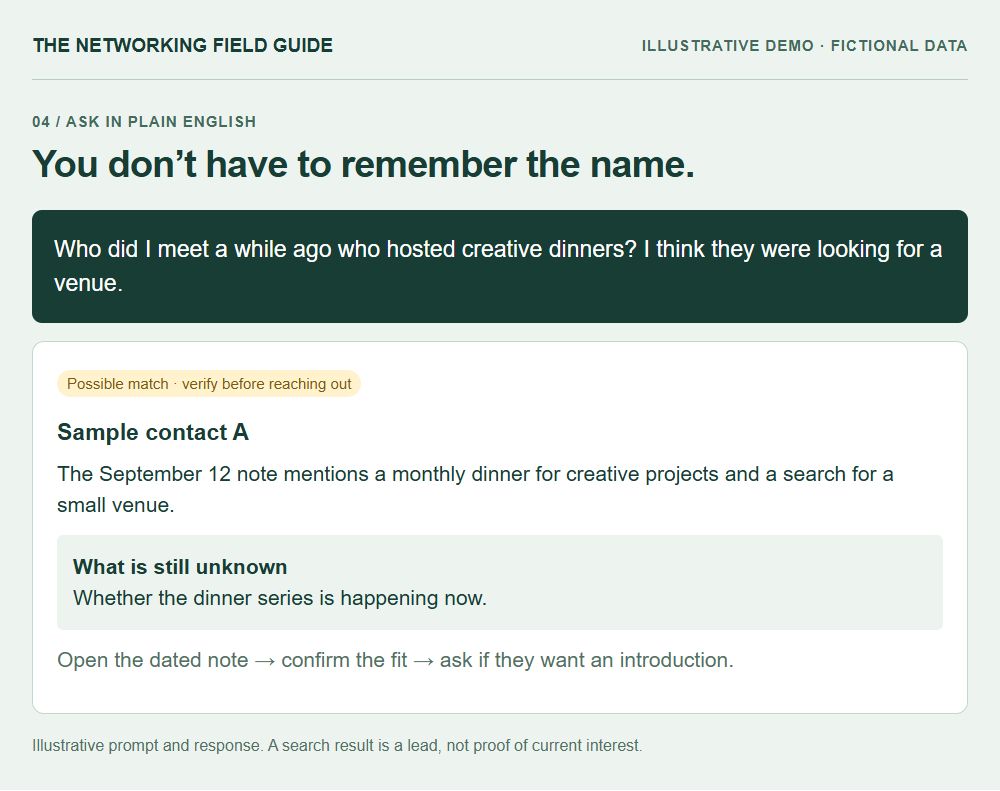
This is how I most often use mine. I go to Codex and ask a question. I do not always know the exact name or tag I’m looking for. Sometimes I remember a city, a project, and half of a conversation. That is enough to start searching.
You can ask for people who have done a particular thing, people nearby with a shared interest, or a reminder of what you discussed before a call. Ask the assistant to return a few matches with the supporting notes and dates. “Here are three people, and here is why they might fit” is much more useful than a confident list with no explanation.
For introductions, the dated evidence matters. Someone who wanted design help two years ago may have solved that problem. The CRM can help you remember the connection, then you can ask whether it is still useful. This is how old conversations become useful again without pretending that everyone’s life stayed frozen.
Who do I know who has built a volunteer community? Show me the specific experience in my notes, when I learned it, and anything that makes the match uncertain.
Before my next call with this person, remind me how we met, what we last discussed, and anything I promised. Separate current facts from old plans.
What interests or small personal details has this person shared that I might want to ask about? Use only my saved notes and show the dates.
11. Add automations that help you be more thoughtful.
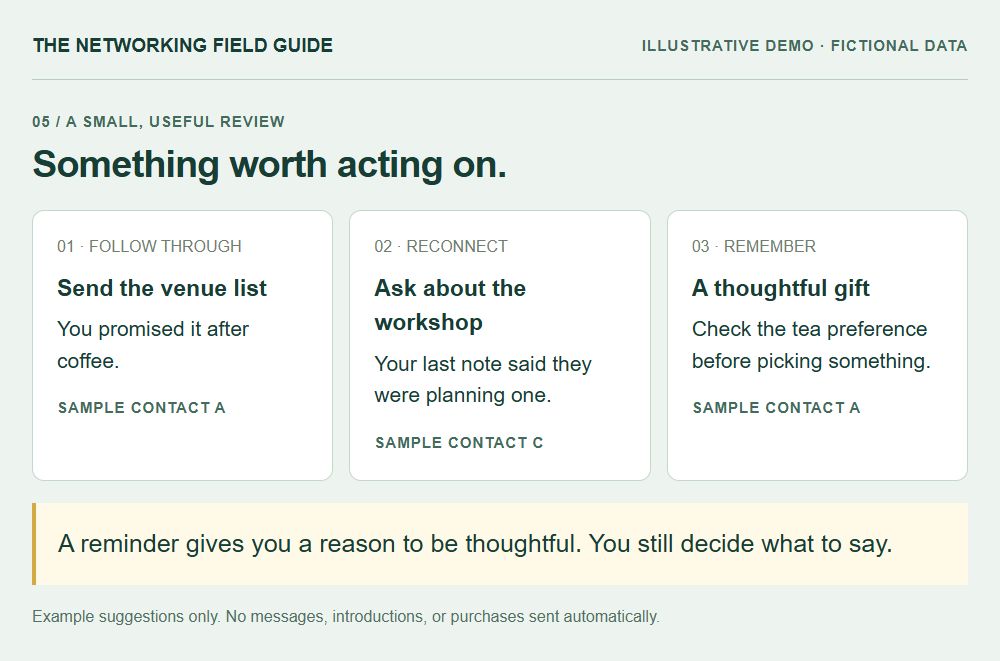
Once the underlying notes are useful, you can put small automations on top. I would choose the ones that answer a question you already ask yourself. A huge daily report that you never read is another thing to maintain.
A catch-up reminder could show a few people you have not spoken with in a while, why they came up, and a real detail from the last conversation. The cadence should be your choice. An annual relationship does not need a weekly nudge, and taking someone out of the reminder queue should be easy.
An introduction finder could compare someone’s current need with other people’s strengths and biographies. For each suggestion, ask for the evidence on both sides and the reason the introduction might help. Then ask each person whether they want it. No reply or no interest means no introduction. A proposed match should never turn into a message sent behind your back.
A pre-meeting brief could surface the last conversation, shared interests, and open promises. A follow-through list could catch “I’ll send that over” before it disappears. For hosting, you could search for a small group with a shared curiosity and enough different experience to make the conversation interesting.
Gift ideas are another fun one. If someone has shared a hobby, favorite food, or oddly specific interest, ask the assistant to use those notes to suggest something thoughtful within a budget. Have it say which detail inspired each idea. You still need to check whether a preference is current and whether a gift is appropriate. Remembering that someone loves tea is useful; confidently inventing their favorite tea is not.
Milestone reminders could help you ask about an upcoming launch, trip, race, or move. Keep “expected” separate from “confirmed,” and phrase the check-in accordingly. There is a big difference between “How’s the planning going?” and congratulating someone on something that has not happened.
You could also ask for opportunities to help: “Is there anyone in my notes who would find this article useful?” or “Who has been looking for someone with this experience?” Keep the suggestions specific and small enough to review. The system should make it easier to notice people, not give you an excuse to blast everyone.
12. Turn your preferences into reusable AI skills.
If you keep correcting the same thing, write down the rule. A skill can give your assistant a repeatable way to find a person, organize a note, check dates, or prepare a catch-up suggestion. My setup uses skills around these kinds of CRM tasks. They help make the behavior more consistent than starting every conversation from scratch.
You could have one skill for finding the correct person, another for proposing a profile update, and another for choosing useful reminders. Keep the jobs clear. A search skill should not quietly edit records. A reminder skill should not decide to send a message. A note-capture skill should know where stable details go and where dated context belongs.
Write the important rules in plain language. Keep the original conversation date. Do not guess a missing birthday year. Do not merge people just because their names match. Show uncertain information as uncertain. Reusing the same source should not add the same conversation twice. If a connection fails, report the missing coverage instead of pretending nothing happened.
You can give the assistant a few fictional examples of good and bad updates. Have it walk through them before using the workflow on real records. This makes your preferences concrete and catches mistakes that a nice-sounding instruction might miss.
Before updating a person, read their existing record and verify the identity. Propose only supported changes. Preserve the source and original date. Keep newer contact dates when adding old notes. If I give you the same note twice, do not duplicate it. Show me unresolved conflicts and never send outreach as part of saving a note.
13. Give the system a little maintenance, too.
An auto-updating personal CRM still needs someone to care whether the updates are right. Review a small sample regularly. Open the source behind a summary. Check whether an old role is being treated as current, whether two records belong to the same person, and whether your reminders are helping or getting ignored.
Ask for a simple connection status: when each source last worked and whether anything could not be checked. “No new updates” and “the connection broke” should be different results. Otherwise, a quiet automation can make you think everything is current when it has stopped reading.
Keep backups and a usable export. If an AI update goes wrong, you want to recover the previous record. If you switch apps, you want the names, dates, links, and notes to travel with you. Try restoring a small sample instead of assuming that a backup file means recovery will work.
Keep the information private, including the backups. Be deliberate about what a connected model can access and how the provider handles it. For screenshots, use fictional records or remove identifying details from the image itself. Hiding a name while leaving a distinctive biography, photo, or contact link is not much of a redaction.
And delete fields from your template when you never use them. You do not get extra points for having a very elaborate personal database. The useful measure is whether you remembered something meaningful, followed through, or helped someone you might otherwise have forgotten to think about.
Start with one week of real use.
Pick ten people. Put them in the tool you already like. Add how you know each one and one thing you want to remember. Then use AI to organize the next messy note you would otherwise leave in your phone.
During the week, ask your CRM one actual question: who could help with a problem, what you promised someone, or what you should remember before a conversation. See whether it returns the right person and useful evidence. Fix that experience before adding more sources.
Then add one reminder you would welcome. Maybe it is a weekly list of open promises. Maybe it is two people you would be happy to catch up with. Try it long enough to know whether you act on it.
That is already a useful system. Over time, you can add meeting notes, supported integrations, more thoughtful searches, and a nicer interface. AI makes the organizing much less painful. The part I care about is what happens next: remembering to ask about the thing someone was excited about, following through, or introducing two people who would love to meet.
Common questions
What is an AI personal CRM?
It is a personal relationship database with an AI assistant that can organize notes, search your saved context, and propose useful updates or reminders. The records live in a tool you control or authorize. AI helps maintain and retrieve them; it does not replace the relationship.
Can I build an AI personal CRM without coding?
You can start with a People database in Notion or person notes in Obsidian and manually ask AI to organize notes. More automatic updates need supported connections, permissions, and a workflow. You do not need to build a custom app to benefit from the basic structure.
Can it automatically update from iMessage, WhatsApp, or email?
A setup could propose updates from sources you authorize, but the method depends on the service. WhatsApp exports are snapshots; Apple device synchronization is not an AI integration. Email connectors and reviewed local workflows may offer other options. Verify access, identity, dates, and coverage for each source instead of assuming one connector handles everything.
Will it remember every conversation?
It can make conversations much easier to retrieve when you have captured them, but it cannot remember information it never received. Summaries can miss details and connections can fail. Keep sources available where appropriate and have the system show uncertainty and missing coverage.
Is a local CRM private if I use a cloud AI model?
Local storage and private network access do not determine where AI processing happens. A connected cloud model may receive the information used for a request. Check the actual data flow, access settings, and provider policies before connecting private records.
Sources & further reading
About this guide and my setup ↗The structure is based on my personal CRM and the rules around finding people, maintaining notes, and tracking contact dates. All interface examples use fictional data.
Notion: relations and rollups ↗How separate People and Conversations databases can be connected.
Obsidian: Bases ↗Database-like views over local Markdown files and their properties.
Obsidian: properties ↗Structured text, lists, links, and dates within notes.
Tailscale Serve ↗A way to share a local web service within a private tailnet.
Model Context Protocol: architecture ↗How AI applications connect with servers that expose tools and resources.
Notion MCP ↗An example of a supported AI connection to read and update authorized content.
WhatsApp: exporting chat history ↗A supported export is a snapshot, not a promise of continuous CRM sync.
Apple: Messages and iCloud ↗Device synchronization background; not documentation of a CRM integration.